What Is a Molex Connector? Types, Uses, Install & Fix
| Table of Contents |
Molex connectors are a familiar presence in electronic engineering—both a brand name and the colloquial term for the "large 4D peripheral power connector" among many engineers. They are commonly encountered in PC builds, industrial equipment wiring, and consumer electronics development. This article breaks down the core knowledge of Molex connectors from a practical application perspective, offering directly applicable insights for both beginners and veterans.
What is a Molex connector, and what is it used for?
Quick Definition
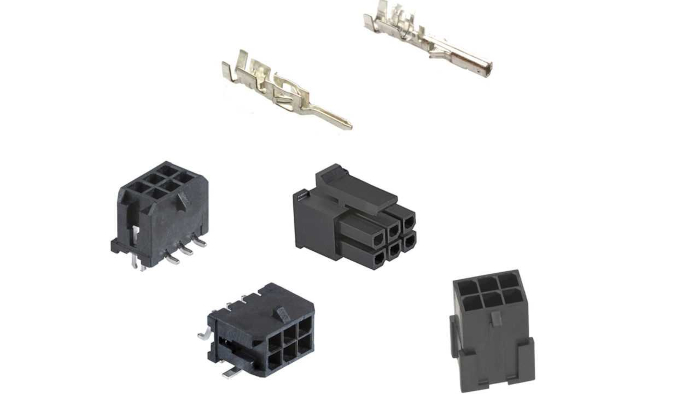
At its core, Molex is a wire-to-wire/wire-to-board electrical connector. It refers to the full range of interconnect products offered by Molex Inc. In PC assembly contexts, it most commonly denotes the 4-pin peripheral power connector (widely known as the large 4D connector). Featuring anti-misinsertion keying to prevent incorrect plugging, it is a critical component for power transmission and signal connections in electronic devices.
Molex Connector Core Structure Labeled Diagram
Common Uses Overview
Molex connectors serve two primary application domains, addressing diverse needs from consumer electronics to industrial equipment:
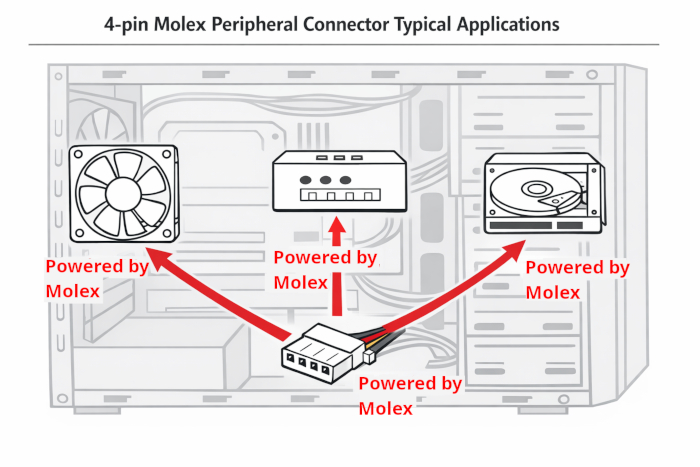
- PC Internal Power Supply: Provides power to peripherals like legacy hard drives, case fans, RGB light strips, and fan hubs. Even modern power supplies often retain 1-2 sets of serial Molex connectors for compatibility.
- Universal Electronic Interconnections: Facilitates wiring harness connections in industrial control systems, internal cabling in consumer electronics, and power transmission for small motors. Its core function is to ensure stable power or signal delivery.
4-pin Molex Peripheral Connector Typical Applications
What are Molex connectors? (Beyond just PC applications)
Molex as a Family of Connector Series
Many people mistakenly refer to all white plastic connectors as "Molex." Engineering distinctions for Molex connectors focus on series, pin pitch, circuit count, and terminal specifications. Common series include:
- Mini-Fit Jr.: 4.2 mm pitch, rated for up to 9.0 A current, commonly used in consumer electronics and mid-power PC power supply applications.
- Micro-Fit 3.0: 3.0 mm compact pitch, suitable for space-constrained high-density devices, with a maximum current of 5.0 A.
- Mega-Fit: 5.7 mm pitch, engineered for industrial applications with a maximum current rating of 30 A, supporting high-power device power delivery.
- KK 254: 2.50 mm pitch supporting 2-43 circuits, a classic wire-to-board connector with 4.0 A current capacity.
Structure and Operation: How Molex Connectors Work
The core operating principle of Molex connectors is "spring-loaded terminal contact + mechanical locking." Key structural components include:
- Contact System: Terminals feature spring-loaded contacts that maintain a stable electrical connection through elastic pressure after insertion. Contact resistance directly impacts power supply stability.
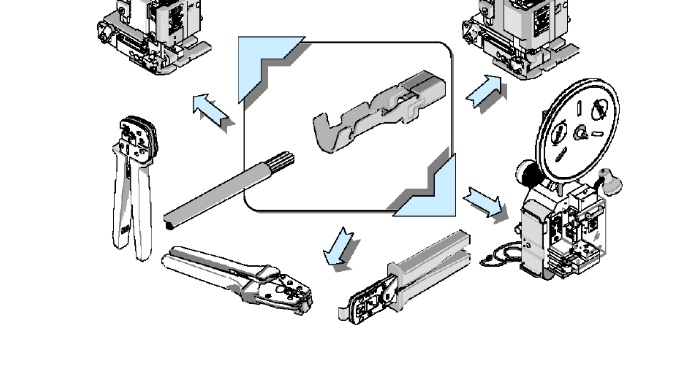
- Crimp Process: Terminals connect to wires via professional crimping. A qualified crimp secures both the conductor and insulation, creating dual fixation.
- Strain Relief: Insulation wings and cable retention structures reduce stress on wires during insertion/removal, preventing terminal dislodgement.
- Locking Mechanism: Available in friction lock and snap-lock types, ensuring the connector remains secure in vibrating environments.
Molex Connector Crimp Quality Comparison
What is a Molex connector? What is an ATX connector?
Molex connectors are electronic connectors produced by the American company Molex. ATX connectors are computer power supply connectors designed to meet the ATX motherboard standard.
PC PSU Connectors Overview
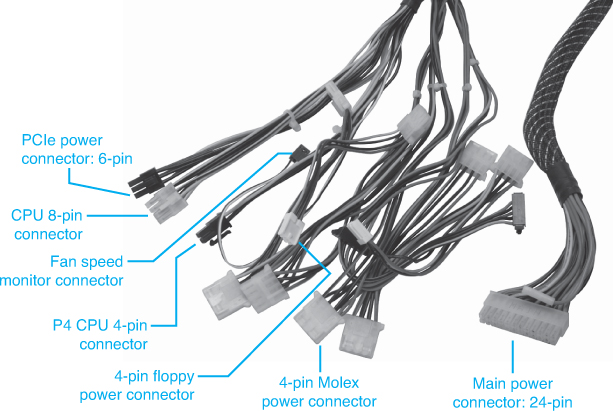
PC power supplies feature numerous connector types, and many users confuse Molex and ATX connectors. The core distinction lies in "power destination and power handling capacity." The specific correspondences are as follows: For a broader overview of computer cable connector types used across PCs and related hardware, refer to our detailed guide.
|
Connector Type |
Primary Function |
Plug-in Position |
Common Misplugging Risks |
|
ATX 24-pin |
Primary Motherboard Power Supply |
Motherboard 24-pin connector |
No key alignment, forcing connection may damage pins |
|
EPS 8-pin |
CPU Dedicated Power Supply |
Motherboard CPU Power Connector |
Confusion with the PCIe interface may cause an insufficient CPU power supply |
|
PCIe 6+2 |
Graphics card power supply |
Graphics card power connector |
Inserted into the motherboard power slot, causing a device short circuit |
|
SATA power |
Modern hard drive / SSD power supply |
Hard drive SATA interface |
No significant risk; foolproof design is well-implemented |
|
4-pin Molex |
Power supply for legacy peripherals/accessories |
Fans, controllers, and other peripherals |
No foolproof alignment may cause an abnormal device power supply |
PC PSU Connectors Identification Guide
Definition of "Molex" in PC Assembly Context: What "Molex" Typically Means in PCs
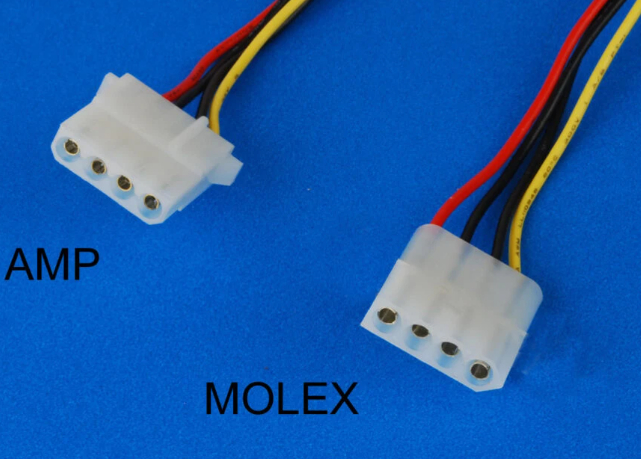
When engineers refer to "Molex" during assembly, 99% of the time they mean the 4-pin peripheral power connector (large 4D connector), which has no direct connection to other Molex product series. Key identification points are straightforward:
- Appearance: White rectangular plastic housing, approximately 20 mm × 10 mm in size, with a beveled chamfer on one side (anti-misinsertion design).
- Pins: Four parallel metal pins spaced 4.2 mm apart, typically color-coded as red, yellow, black, black (red = 5V, yellow = 12V, black = GND).
- Latch: A black plastic latch near the wire end emits an audible "click" when inserted. Press the latch before applying force to disconnect.
4-pin Molex Connector Physical Feature
Where are Molex connectors commonly used in hardware systems?
Molex connectors, renowned for their diverse types and high reliability, are widely adopted in hardware systems across multiple fields, including computers, automobiles, industrial equipment, data centers, medical devices, and consumer electronics.
Common PC Uses
In PC assembly and case modifications, core applications of Molex connectors include:
- Fan Expansion: Powering multiple case fans via Molex-to-fan interface cables, particularly suitable for older cases lacking fan hubs.
- RGB Device Power: Early RGB light strips and controllers often use Molex connectors. Please make sure power matching (single 12V strips typically consume no more than 5W).
- Legacy Device Compatibility: Older storage devices, such as IDE hard drives and optical drives, require power via Molex connectors.
- Adapter cable applications: Molex-to-SATA adapters resolve insufficient power supply to SATA ports, but are not recommended for long-term use with high-speed hard drives.
- A simple criterion for determining whether a Molex connector is required: If the device interface features a 4-pin white plastic housing without anti-misinsertion grooves (or only has chamfers on one side) and is labeled "12 V/5 V," it typically requires a Molex power supply.
Industrial & consumer uses
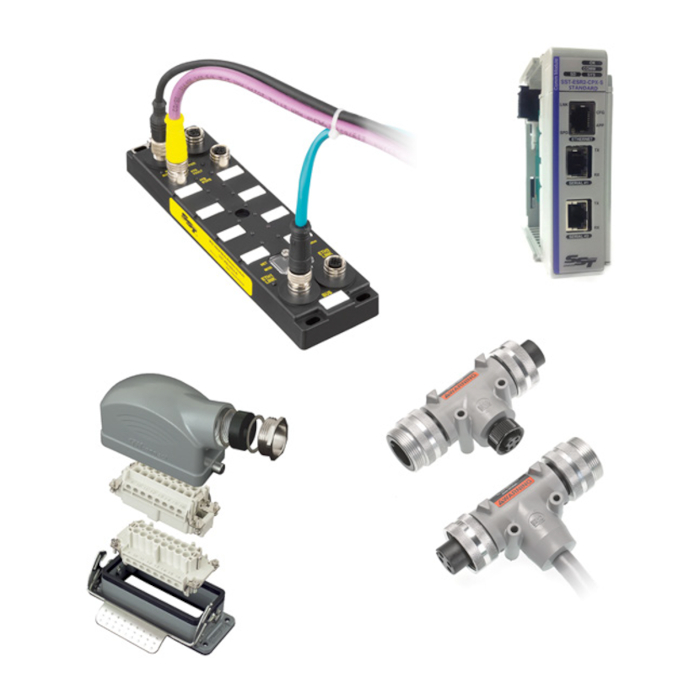
Beyond PCs, Molex connectors are used across a broader range of industrial and consumer electronics applications. Typical scenarios include:
- Industrial control systems: Connecting PLC modules to sensors and internal wiring in variable frequency drives. Commonly uses the Mega-Fit and Mini-Fit series, designed to withstand industrial vibrations and temperature variations (-40°C to +105°C), meeting Molex industrial-grade standards.
- Automotive electronics: Molex connector families may be used in navigation systems, instrument panels, lighting modules, sensors, and other vehicle subsystems. Selection should be based on the exact series, terminal system, wire size, sealing, temperature, vibration, current, and voltage requirements. For a broader comparison, see this guide to automotive connector types.
- Consumer Electronics: For internal power distribution in printers and projectors, the Micro-Fit series enables compact multi-device power supply solutions.
- Medical Devices: Signal transmission in compact diagnostic equipment utilizes low-contact-resistance Molex connectors to ensure signal stability.
Molex Industrial Application Diagram
What do 4-pin Molex connectors do?
The 4-pin Molex connector (also commonly called the large 4-pin D-type Molex connector) is a classic Molex power connector model. Its core function is to provide medium- to low-voltage DC power to electronic devices. It was also a long-used universal power supply interface in the desktop computer field, offering strong versatility, stable contacts, and compatibility with the power supply requirements of various peripherals and accessories.
Understanding Voltage Rails and Pinout
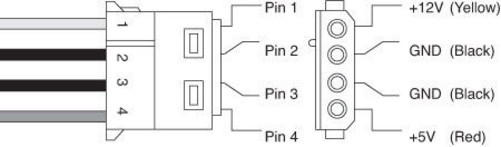
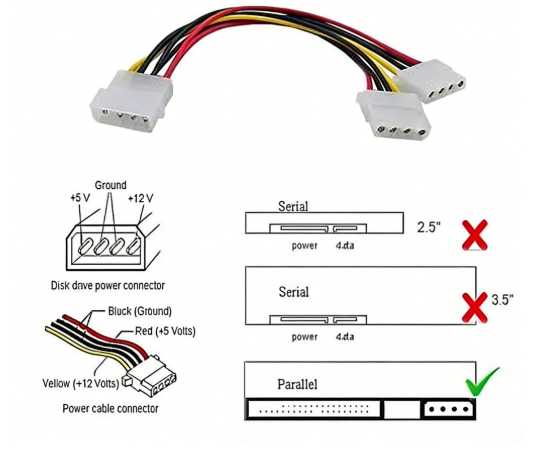
The core function of the 4-pin Molex connector is to provide dual voltage rails. The pin definitions (from left to right, with the locking tab facing upward, consistent with the official Molex datasheet) are as follows:
- Pin 1 (red wire): 5V power rail, primarily supplies low-power peripherals such as small fans and sensors.
- Pin 2 (black wire): Main ground (GND).
- Pin 3 (black wire): Auxiliary ground (GND).
- Pin 4 (yellow wire): 12 V power rail.
- Note: Wire colors may vary slightly across different power supply brands. The core identification principle is "Red = 5V, Yellow = 12V, Black = GND," but always refer to the power supply manual to avoid misjudgment based solely on color.
4-pin Molex Pinout Definition
Typical loads and what to avoid
The 4-pin Molex connector (standard model 043045-0811, etc.) is rated for 8 A (per the official Molex datasheet). In practical applications, reserve a 30% margin (recommended maximum load current ≤5.6 A) and avoid prolonged full-load operation. Follow the "load matching" principle:
- Suitable loads: Single devices ≤100 W, e.g., 80 mm case fans (approx. 2 W), single RGB light strips (≤5 W), small controllers (≤10 W).
Not recommended:
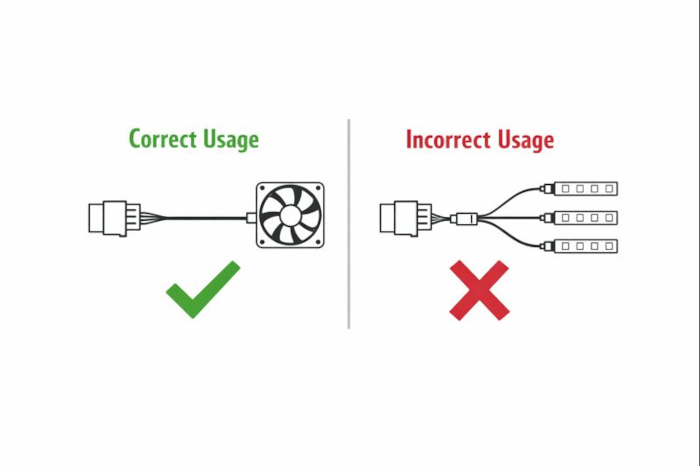
- Multi-branch wiring: Using splitters (e.g., 1-to-3 or 1-to-4 adapters) to simultaneously power multiple high-power devices can cause terminal overheating.
- High-power devices: Directly powering devices exceeding 100 W causes excessive contact resistance, leading to terminal burnout.
- Substandard adapters: Using adapter cables with wire gauge smaller than 20 AWG (cross-sectional area ≤0.51mm²) increases conductor resistance, leading to voltage drops and overheating.
Molex Load Usage Warning
How to Properly Connect a Molex Connector in a PC PSU
Molex connectors feature a straightforward, foolproof design for PC power supply connections. The core principle is to align the connector's latches/pins and insert/remove it directly—no tools required—making it easy, even for beginners.
Step-by-step connection guide
The core principles for correctly connecting a Molex connector are "alignment with anti-misinsertion + full insertion + secure locking." Follow these steps:
- Power-off preparation: Turn off the power switch, unplug the power cord, and press the case power button to discharge residual electricity, preventing short circuits during live operations.
- Identify the Connector: Distinguish the Molex connector from PCIe and SATA connectors. The Molex connector features a 4-pin white plastic housing with no notch design (or a single-sided chamfer).
- Align direction: Match the connector's beveled edge with the device port's chamfer. Ensure the pin orientation aligns naturally.
- Insertion: Pinch the connector housing between your thumb and index finger (do not pull the cable), then push vertically until you hear a "click" and the latch snaps into place.
- Confirm Secure Fit: After insertion, gently tug the wire. If the connector remains secure, installation is complete. If it pulls out easily, reinsert.
- Removal technique: While pressing the latch, gently wiggle the connector side to side and pull straight up. Avoid applying force to one side only, which may bend the terminals.
Using adapter cables safely
Molex adapter cables (e.g., Molex-to-SATA, Molex-to-fan) are standard emergency accessories, but safety limits must be observed during use:
- Wire Gauge Requirement: Adapter cables must use wire gauge≥20 AWG. Thicker wires are better at preventing overheating caused by thin wires.
- Load Limit: Connect no more than 2 low-power devices per adapter cable, with a total power draw of up to 50 W.
- Quality Selection: Prioritize certified brand products; avoid unshielded or poorly crimped low-quality adapters.
- Substitution Principle: For long-term use, prioritize power supplies with native ports. Adapters should be used only as temporary solutions, and continuous use should not exceed one month. For sustained operation, replace with a power supply or device featuring native ports.
Common Molex Failures and How to Fix Them
Failures in 4-pin Molex connectors typically fall into three categories: physical contact issues, cable aging, and damaged latches. These are generally minor problems that can be manually repaired without specialized tools.
Failure modes and symptoms
Molex connector failures primarily occur at three critical points: contact, crimping, and locking. Common symptoms and their causes are listed below:
- Intermittent power loss: Device occasionally stops working, resumes after unplugging and replugging. Often caused by increased contact resistance (terminal oxidation or improper insertion).
- Fan intermittent operation: Unstable power supply, potentially caused by terminal spring fatigue, loose wire crimping, or excessive voltage drop.
- Interface overheating/discoloration: Connector housing turns yellow or black. Root causes include arcing from poor contact or exceeding the rated power.
- Complete Power Loss: Device fails to start, possibly due to terminal detachment, wire breakage (caused by faulty crimping), or an improperly secured locking mechanism.
Quick fixes and replacement steps
When encountering Molex faults, prioritize the sequence: "Clean → Inspect → Repair → Replace." Prepare the following tools: multimeter, crimping pliers, pin puller, alcohol swabs:
- Clean terminals: Wipe terminal surfaces with alcohol swabs to remove oxidation and dust. Avoid using abrasive materials like sandpaper.
- Check connection: Use a multimeter to test continuity between the pin and wire. If no continuity is detected, the crimp may be loose and needs to be recrimped.
- Recrimp: Use a pin puller to remove the terminal. Trim the wire (leaving 8-10 mm of exposed conductor). Use crimping pliers to compress the conductor and insulation simultaneously, ensuring the terminal is secure.
- Replacement Parts: If the connector housing is deformed, terminals are burnt, or wires are aged, replace the entire Molex connector assembly (including terminals and housing).
- Alternative Solution: If failures occur frequently, prioritize switching to SATA power or native interfaces to avoid repeated repairs.
Why does everyone hate Molex?
The primary reason for the widespread dislike of 4-pin Molex connectors is that their design and performance lag behind modern PC hardware. Coupled with numerous inherent flaws exposed during long-term use, their shortcomings are magnified when compared to current mainstream power interfaces. Simply put: they're "troublesome to use, offer poor experience, and are prone to failure."
Engineering reasons behind the hate
Engineers frequently criticize Molex connectors, with core issues concentrated in three engineering design aspects:
- High insertion force: The terminal spring pressure is too tight, requiring significant force to connect. Novices often accidentally pull cables, causing loose connections.
- Insufficient anti-misinsertion design: Early models relied solely on beveled chamfers for misinsertion prevention, lacked precise anti-reverse grooves, and thus made incorrect orientation easy.
- Poor contact reliability: Terminal spring fatigue occurs over time, compounded by dust and oxidation, increasing contact resistance and failure rates.
- High risk of adapter misuse: The prevalence of substandard adapter cables—featuring inadequate gauge wire and poor crimping—causes overheating and safety hazards, tarnishing Molex's reputation.
In reality, most of these issues can be avoided through proper procedures, such as using specialized tools for insertion/removal, selecting certified accessories, and performing regular inspections and maintenance. Molex's advantages in compatibility and versatility still make it the preferred choice in many scenarios.
Why did the IT industry replace Molex with SATA power?
The IT industry's comprehensive shift from 4-pin Molex to SATA power connectors stems from SATA's seamless alignment with PC hardware's technological evolution—transitioning from the "old IDE mechanical era" to the "modern SATA/SSD slim era." SATA outperforms Molex in design, user experience, safety, and versatility, and fits PC hardware trends toward miniaturization, intelligence, and standardization.
Molex vs SATA Power Comparison
The IT industry's shift toward SATA power connectors stems from SATA's superior suitability for modern devices in terms of usability, safety, and compatibility. Specific comparisons are as follows:
|
Comparison Dimensions |
4-pin Molex |
SATA Power |
|
Plug-and-play Experience |
High insertion force requires alignment with a chamfer |
Smooth insertion/removal with a distinct anti-misalignment groove |
|
Power Supply Stability |
Contact resistance tends to increase, resulting in a noticeable voltage drop. |
Multi-contact design ensures a more stable contact |
|
Load compatibility |
Suitable for low-to-medium power devices, up to 100 W |
Specifically designed for hard drives/SSDs with precise power matching |
|
Cable management difficulty |
Large connector size and stiff cable make cable management difficult |
Flat cable + compact connector for neater cable management |
|
Anti-misinsertion design |
Single-sided chamfering provides only moderate misinsertion prevention |
Dedicated groove + keyway completely prevents misinsertion |
Migration and replacement tips
To migrate from Molex to SATA power connectors smoothly, follow these steps:
- Prioritize native interfaces: When purchasing a new power supply, select a model with ample SATA ports (at least 4) to avoid reliance on adapter cables.
- Upgrade components: Replace older Molex-powered fans and controllers with SATA-powered versions for lower cost and higher stability.
- Use adapters judiciously: If adapters are necessary, select short cables (≤30 cm) with 20 AWG or thicker wire, connecting only one device per adapter.
- Retain for Industrial Scenarios: Continue using Molex connectors in industrial equipment, legacy instruments, and other applications that demand high compatibility, with regular maintenance.
Engineering Selection & Sourcing Tips
Key Parameter Selection
When selecting Molex connectors (and matching Berg connector/JST connector), prioritize six core parameters over brand considerations, ranked by importance (for Electrical power connector systems):
- Current Rating: Calculate based on device power (e.g., SATA drives/SCSI disk drives), allowing a 30% margin (e.g., for a 10 W device at 12 V, current is 0.83 A; select a connector rated at 1.2 A or higher, compatible with ATX power supply).
- Pitch: For space-constrained applications (e.g., Atari AR2, CMOS rechargeable battery), choose 2.0-3.0 mm series (Micro-Fit with multipoint contact designs). For medium power, select 4.2 mm (Mini-Fit with crimp terminals). For high power, opt for 5.7 mm (Mega-Fit with terminal lock lances).
- Operating temperature: For industrial applications (using Board-Side Solder Connector Headers), select the wide-temperature range series (-40°C to +105°C). For consumer electronics, the 0°C to +85°C range is sufficient (matching polarized housings).
- Mating cycles: For frequent insertion/removal scenarios (e.g., test equipment with male connector variants), select a series with ≥500 cycles; for fixed installations (e.g., Voltage Selector connections), ≥200 cycles suffices.
- Terminal plating: Gold-plated terminals (low contact resistance) for humid environments; tin-plated terminals (lower cost) for standard environments (compatible with double crimp options).
- Wire gauge compatibility: Ensure the connector supports the device's wire specifications (e.g., for 20-24 AWG wires, select corresponding terminals) and housing options.
BOM and accessories BOM: housing, terminals, tooling
BOM and accessories BOM: housing, terminals, tooling When purchasing Molex connectors (and compatible JST connector/Berg connector) for Electrical power connector systems, the BOM must explicitly list "housing (housing options, including polarized housings) + terminals (crimp terminals with double crimp options) + crimping tool" to avoid purchasing only the housing, which renders the assembly unusable (especially for ATX power supply setups):
- Housing: Specify series, pin count, and orientation (straight/angled, matching Board-Side Solder Connector Headers), e.g., "Mini-Fit Jr. 4-way straight housing (compatible with SATA drives/SCSI disk drives)."
- Terminal: Must match the housing series, specify compatible wire gauge (e.g., 20-24 AWG for Atari AR2), and support multipoint contact designs, e.g., "Mini-Fit Jr. 20-24 AWG terminal (with terminal lock lances)."
- Crimping tool: Prioritize Molex-specific crimping pliers (for double crimp options); avoid using standard pliers (which may deform terminals, affecting Voltage Selector stability and CMOS rechargeable battery power).
- Procurement Recommendations: For small-volume purchases (≤100 sets, e.g., for male connector variants), prioritize suppliers with stock availability and require same-day shipment. For large-volume purchases, verify genuine authenticity (to avoid substandard parts) and request quality inspection reports.
Summary
Despite drawbacks such as inconvenient insertion/removal (of male connector variants) and insufficient anti-misinsertion features (vs polarized housings), Molex connectors (paired with crimp terminals using double crimp options) remain irreplaceable for their compatibility (with Electrical power connector systems, including Berg connector/JST connector), versatility (powering SATA drives/SCSI disk drives and Atari AR2), and industrial adaptability (matching Board-Side Solder Connector Headers). Whether for PC builds (with ATX power supply) or engineering R&D, adhering to the core principles of "selecting by series (considering multipoint contact designs), installing per specifications (aligning with Voltage Selector), and performing regular maintenance (checking terminal lock lances)" prevents most failures.
When procuring Molex connectors, prioritize authentic products and reliable suppliers to ensure full compatibility with housing options, terminals, and crimping tools (to protect CMOS rechargeable battery power). For modern electronics with native SATA or specialized interfaces, these should be preferred alternatives. However, Molex connectors remain a stable and dependable choice for legacy equipment and industrial control systems.