What Are TWS Earbuds: How They Work, Pros and Cons
What Are TWS Earbuds and How Do They Work?
What Are TWS Earbuds?
TWS (True Wireless Stereo) earbuds, also known as True Wireless Stereo (TWS) earbuds, are a type of completely wireless earpiece. Their core definition is: there is no physical cable connecting the left and right earpieces; each operates independently and pairs with audio source devices like smartphones entirely via Bluetooth, thereby delivering a truly unrestrained audio experience.
In short, TWS earbuds are defined by their complete lack of connecting wires. This type of in-ear product achieves completely wireless wearing and listening through true wireless stereo technology and Bluetooth connectivity.
How do TWS earphones work?
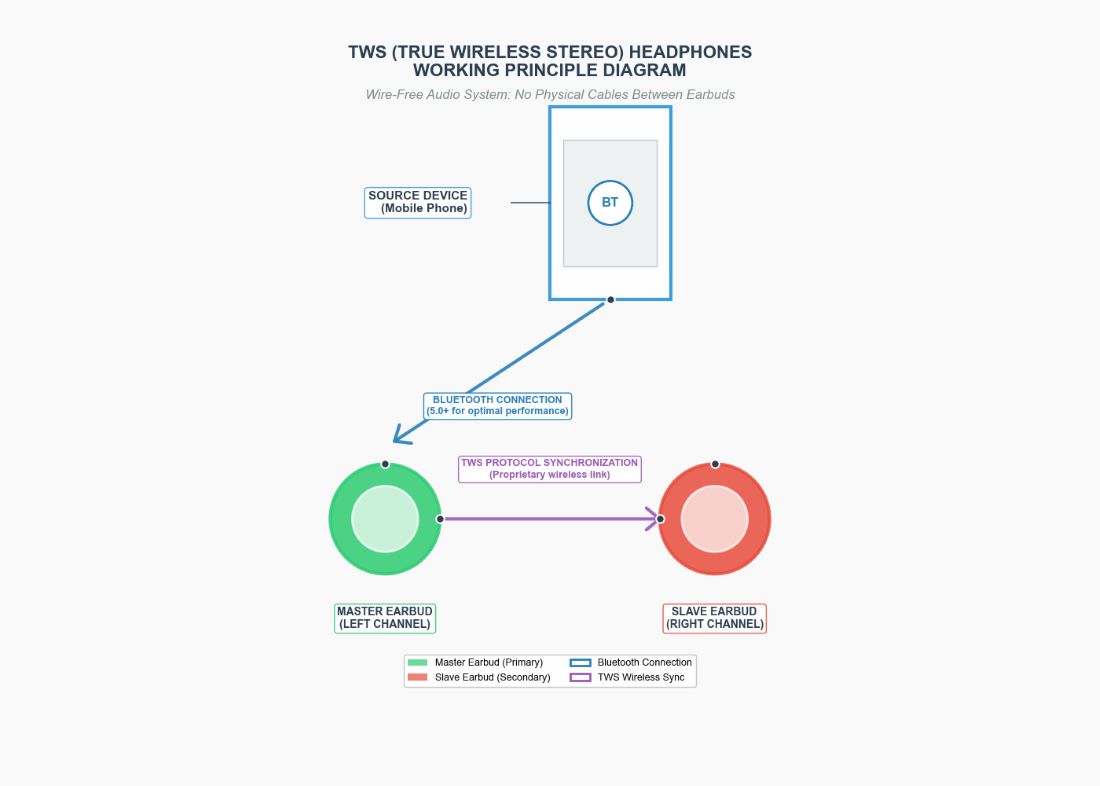
The workflow of TWS earbuds typically employs either the traditional "Master-Slave Forwarding" or the modern "Dual-Channel Transmission" method. Here is how they generally establish a connection:
Step 1: Bluetooth Pairing and Connection
When you open the charging case, the earbuds typically enter pairing mode automatically. Your phone (the audio source device) first establishes a Bluetooth connection with the earbuds. In traditional systems, it connects to a "primary earbud," while in modern systems (like TrueWireless Mirroring), it connects to both earbuds simultaneously or allows independent switching.
Beyond connecting to a single device, a pivotal advancement in TWS technology is Multipoint Connection. This feature allows a single pair of earbuds to maintain simultaneous, stable connections to two or more audio source devices (e.g., a laptop and a smartphone), intelligently managing audio routing based on user activity. From an electronic components and design perspective, implementing robust multipoint functionality significantly elevates system complexity. It demands a more powerful main control chip (MCU) with enhanced processing capabilities and memory to manage multiple Bluetooth protocol stacks and audio streams concurrently. The Bluetooth radio and antenna design must also be optimized for lower latency and higher stability when rapidly switching between devices, often requiring sophisticated firmware algorithms for seamless handover.
Step 2: TWS Protocol Wireless Synchronization
This is a crucial step in achieving true wireless stereo. In Master-Slave systems, the primary earbud relays audio to the secondary one. However, most modern TWS earbuds use binaural synchronous transmission, where left and right earbuds receive signals directly from the source to reduce latency and improve stability.
Step 3: Stereo Separation and Playback
After synchronization, the audio signal is separated into independent left and right channels, each played through its corresponding earbud. The left and right earbuds work in precise coordination to deliver synchronized, complete stereo audio, providing an immersive listening experience.
● What Does TWS Mean for Earbuds?
TWS stands for True Wireless Stereo. This term precisely defines its core technology: it is a protocol solution enabling complete wireless connectivity between audio devices, facilitating stereo pairing and synchronization.
At its core, TWS technology aims to eliminate all physical cable constraints between audio devices. It is not only applied to the familiar TWS earbuds, enabling the left and right earpieces to operate independently and form a stereo system, but also widely used in other wireless audio applications, such as:
Bluetooth Speaker Pair: Two independent wireless speakers connect via TWS protocol, functioning as left and right channels respectively to create a wider soundstage with enhanced spatial awareness.
Soundbar and wireless subwoofer combination: This technology is also commonly used between soundbars and subwoofers in home theater systems, enabling stable, synchronized wireless audio transmission without the need for cumbersome wiring to the rear speakers and subwoofer locations.
Simply put, TWS (True Wireless Stereo) is essentially an advanced wireless audio solution. Its core value lies in enabling multiple audio units to work in tandem through stereo pairing technology, delivering a pure, unrestrained, high-quality stereo listening experience for users.
How Are TWS Earbuds Different from Regular Wireless or Wired Earbuds?
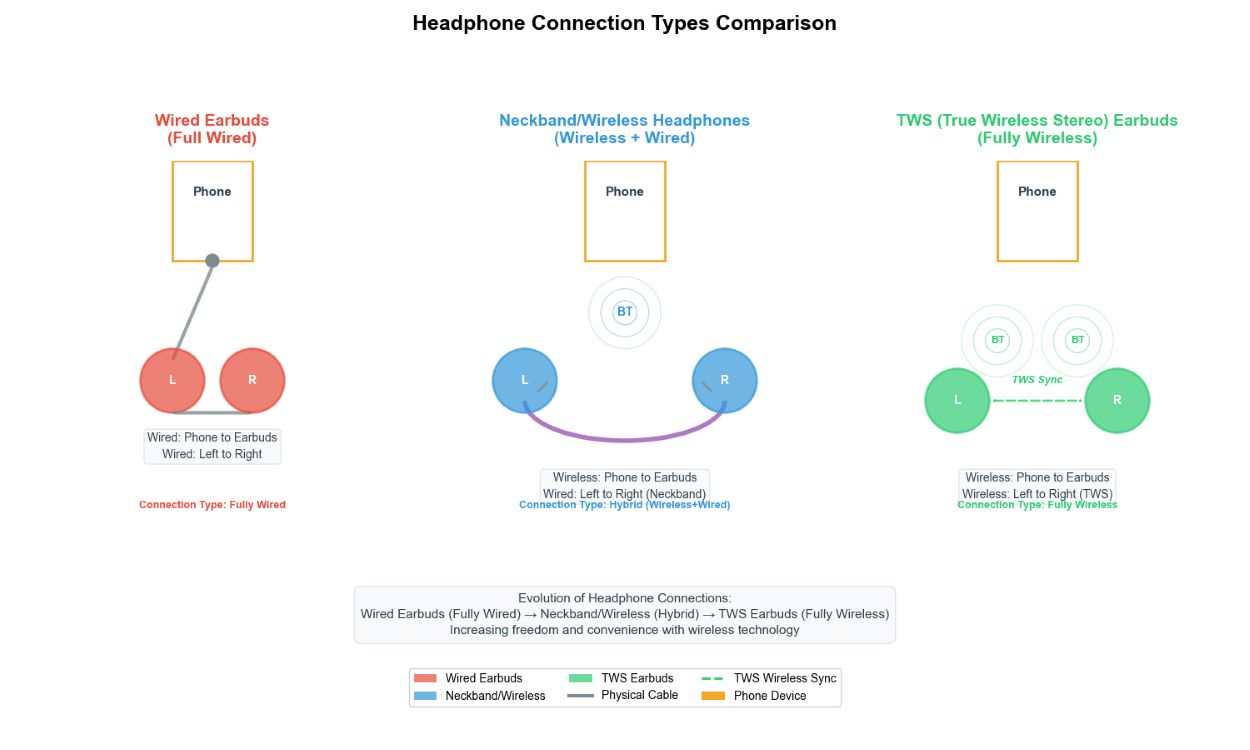
We use a table to clearly compare the core differences between TWS earbuds and other types of headphones. This distinction primarily stems from their connection methods.
| Characteristic Dimension | Wired earbuds | Neckband/Standard Wireless Earbuds | True Wireless Stereo (TWS) Earbuds |
| Connection Pattern | There are physical cables between the phone and the headphones, as well as between the left and right earpieces. | The connection between the phone and headphones is wireless (Bluetooth), but the left and right earpieces are connected by a cable (via a neckband or cord). | The connection from the phone to the headphones is wireless, and there is no physical connection between the left and right earpieces either. |
| Degree of Freedom | Lowest, cables are prone to tangling/microphonics (stethoscope effect), and the range of motion is limited by cable length. | Moderate, free from the tether to your phone, but the neckband or connecting cable remains noticeable and may bounce during exercise. | Ultra-low profile, virtually imperceptible wear, with independent left and right ear operation for maximum freedom of movement. |
| Convenience | Plug and play, no charging required, but plugging in, unplugging, and managing the cables can be a bit of a hassle. | Requires charging, but features a large battery with extended battery life; the neck strap is easy to hang and less prone to loss. | Requires charging; use with a charging case for portable power replenishment. Compact but requires careful storage to prevent loss. |
| Typical Scenarios | Calls, office work, and scenarios demanding high audio quality and zero latency (such as professional music production and gaming). | Commuting, fitness, and daily use—striking a balance between wireless connectivity, battery life, and anti-loss features. | Pursuing scenarios of ultimate simplicity and freedom, such as sports, daily commuting, and pairing with smart wearable devices. |
In summary, the evolution from wired earbuds to neckband/standard wireless headphones and finally to TWS earbuds has centered on the continuous liberation of connectivity forms, ultimately achieving complete wireless transmission from the audio source to both ears.
● Which Is Better for Daily Use, TWS Earbuds or Traditional Earbuds?
Comparison and Selection Recommendations for TWS Earbuds vs. Traditional Earphones (Wired/Neckband Wireless) in Daily Use Scenarios.
In various everyday scenarios, TWS earbuds and traditional wired earbuds each have their own advantages and disadvantages. The key to choosing lies in identifying your core needs—whether you prioritize ultra-low audio latency and connection stability, or seek the freedom and portability of wireless listening. The table below provides a clear comparison:
| Daily usage scenarios | Recommended Solution | Core Reason |
| Commuting/Travel | True Wireless Stereo (TWS) Earbuds | Ultimate portability and freedom: Completely wireless design for effortless wearing and storage. No more tangled cables when getting in or out of vehicles or walking, making it easy to answer calls. |
| Exercise and Fitness | True Wireless Stereo (TWS) Earbuds (Ensure secure fit) | Unburdened Experience: Completely eliminate interference from dangling wires for unrestricted movement. Multiple waterproof and sweat-resistant models available. |
| Office/Video Conferencing | As needed | Flexible Choices: - TWS Earbuds: Convenient for moving around your workspace and answering calls flexibly, but battery life requires attention. - Traditional Wired Headphones: 100% reliable connection stability, zero latency, no charging needed—ideal for long hours working in a fixed location. |
| Games/Media | Traditional wired headphones or low-latency gaming wireless headphones. | High demands on audio latency: Traditional wired headphones offer zero latency and absolutely stable connectivity, ensuring perfect audio-visual synchronization. While some TWS models feature low-latency modes, they typically still fall short of wired solutions. |
Summary Recommendations: Vary according to the individual and the situation
There is no “absolutely better” headphone; only the “more suitable” choice. If you prioritize audio latency and absolute connection stability (e.g., competitive gaming, professional audio/video editing), traditional wired headphones or professional low-latency wireless headphones remain the top choice. If freedom, portability, and unobtrusive wearability are your top priorities (e.g., commuting, exercise, daily mobility), TWS earbuds deliver revolutionary convenience. Assess your core usage scenarios and preferences to make the most suitable choice.
What Are the Advantages of Using TWS Earbuds?
The advantage of true wireless earbuds lies in their seamless integration of portability, intelligent features (such as active noise cancellation and transparency mode), and innovative charging case battery solutions. This provides users with unprecedented convenience and high-quality audio experiences across diverse daily scenarios. Through innovative design, true wireless earbuds elevate the audio experience in multiple dimensions. Their core advantages can be summarized as follows:
Ultimate portability and freedom: Completely free from cable constraints, delivering an unrestricted wearing experience. Ideal for sports, fitness, and daily commuting scenarios, significantly enhancing freedom of movement and safety.
Efficient Battery Ecosystem: The uniquely designed charging case not only offers convenient storage but also provides multiple recharges for the earbuds anytime, creating an “on-the-go charging” system that perfectly resolves battery anxiety during long business trips or all-day use.
Integrated Intelligence and Listening Modes: Modern true wireless earbuds typically incorporate multiple practical features. For instance, active noise cancellation instantly blocks out environmental noise from planes, subways, and other settings, helping you focus on work or immerse yourself in entertainment. Transparency mode, meanwhile, allows you to clearly perceive surrounding ambient sounds without removing the earbuds, ensuring safety during outdoor commutes or facilitating quick conversations with others.
Advantages of Scenario-Based Applications:
Travel and Commuting: Exceptionally portable, paired with a charging case and active noise cancellation, it effortlessly handles long-haul flights and noisy subways.
Fitness and Exercise: The completely wireless design ensures uninterrupted running and workouts, while the waterproof feature enhances the experience.
Office Meetings: Integrated HD microphone and touch controls for seamless video conferencing or quick call answering.
● What Are the Disadvantages of TWS Earbuds?
The core drawbacks of TWS earbuds primarily stem from their wireless and highly integrated design. Battery degradation inherently limits their lifespan. Bluetooth connectivity may experience signal interruptions in complex environments, impacting audio stability and low-latency performance. Furthermore, the fully independent wearing style increases the risk of losing earbuds, while the precision-encapsulated internal structure significantly raises waterproofing, dustproofing, and subsequent repair costs. These factors collectively represent the technical trade-offs users must consider when enjoying wireless freedom. They can be summarized as follows:
Limited overall lifespan: Its battery life relies entirely on the built-in battery, and battery degradation is an unavoidable issue. Over time, battery capacity decline will significantly reduce both single-use duration and charging case endurance, and replacement is typically difficult to perform independently. This factor determines the product's overall lifespan.
Higher risk of loss: Due to the earbuds' compact size and fully independent design, there is a risk of losing them during exercise or daily use. Not only are individual earbuds prone to falling out and getting lost, but the charging case itself—which serves as the core for charging and storage—can also become a single point of failure for loss.
Connection and Latency Issues: Relying on Bluetooth connectivity may result in signal interruptions or instability in complex wireless environments, such as crowded areas. Furthermore, even in low-latency mode, it typically cannot fully match the real-time synchronization demands of wired connections in gaming or professional audio-visual editing.
Higher structural and reliability requirements: The intricate charging compartment and internal earbud structure demand enhanced waterproofing, dust resistance, and drop resistance. Repairs are typically challenging and costly.
Risk Disclosure: Choosing TWS earbuds means striking a balance between ultimate portability and compromises in the aforementioned technologies. We recommend evaluating your priorities regarding battery aging cycles, tolerance for signal interruptions, and the risk of losing earbuds based on your actual usage scenarios to make an informed decision.
Are There Different Types of TWS Earbuds Available?
Structurally, they are primarily categorized into four types: in-ear (offering optimal noise isolation), semi-in-ear (comfortable to wear), earhook (secure fit, typical for sports earbuds), and open-ear (safe and breathable), catering to different ear canal shapes and usage scenarios. Functionally, beyond basic audio playback and calls, they have evolved into specialized variants: noise-canceling headphones emphasizing active noise reduction, gaming headsets optimized for low-latency audio-visual synchronization, and multi-device connectivity models supporting simultaneous connections to multiple devices.
| Core Types of TWS Earbuds Compared | ||||
| Structural Type | Physical Form and Characteristics | Core Strengths and Weaknesses | Suitable ear canal/people | Typical Application Scenarios |
| In-Ear | Equipped with silicone/memory foam earplugs that fit deep into the ear canal to create a physical seal. | Advantages: Excellent sound isolation, best active noise cancellation performance, solid low-frequency response. Disadvantages:Some individuals experience distending pain, with the stethoscope effect being relatively pronounced. |
Individuals with moderately sized ear canals; Those with strong requirements for sound insulation and noise reduction. | ECommuting (subway, airplane), office work (noisy environments), focused studying. |
| Semi-In-Ear | Without ear tips, the earbuds rest in the concha cavity without entering the ear canal. | Advantages: Comfortable to wear, no pressure, excellent breathability. Disadvantages: Inherent limitations in physical sound insulation and active noise cancellation performance. |
Individuals with sensitive ear canals or those who find in-ear designs uncomfortable; users prioritizing comfort above all else. | Daily office work, short commutes, home leisure, and extended calls. |
| Earhook/Sports Style | Typically based on in-ear or earbud designs, with the addition of an ear-hook/ear-wing structure for secure fit. | Advantages: Extremely secure fit—won't fall out even during vigorous movement—making them the top choice for sports headphones. Disadvantages: Slightly complex structure; some styles are inconvenient to store. |
All individuals, especially sports enthusiasts and outdoor workers. | Exercise (running, fitness training), outdoor activities, physical labor. |
| Open-ear/Ear-hook | Features an ear-clipping or ear-hook design that does not fully seal the ear canal, allowing sound waves to travel through air conduction. | Advantages: Comfortable to wear, safe (allows ambient sound to be heard), suitable for extended use. Disadvantages: Sound leakage, weak bass, not suitable for noisy environments. |
All individuals, especially sports enthusiasts and outdoor workers. | Commuting (be mindful of traffic), office work (requires interaction with colleagues), running, and business travel. |
Classified by functional dimension: Technology defines experience
Beyond the core architecture, functional specialization further segments the market, underpinned by distinct chip and algorithm solutions:
Basic model: Core components include a Bluetooth audio SoC, speaker, and microphone, enabling fundamental wireless audio and call functionality.
Active Noise Cancellation Model: Features forward/feedback MEMS microphones and an active noise cancellation chip added to the base model. It generates counter-phase sound waves through algorithms to cancel out noise, representing the standard configuration for in-ear noise-canceling headphones.
Low-latency gaming version: Utilizes high-end Bluetooth chips supporting low-latency modes (such as gaming mode) and may include a dedicated wireless transmitter, reducing latency to millisecond levels to meet esports demands.
Multi-Device Connection Model: Powered by a Bluetooth chip and supporting firmware, it maintains simultaneous connections with two devices (such as a phone and a computer) and intelligently switches between them, boosting productivity.
Choosing TWS earbuds fundamentally involves striking a balance between the physical characteristics of structural form and the electronic performance of functional technology. For instance, those seeking ultimate noise cancellation should prioritize in-ear designs paired with ANC functionality; conversely, sports earbuds require ear-hook structures to ensure a secure fit.
From the perspective of the component industry, this market is evolving from “generic products” to “scenario-specific solutions”: the high-end market pursues integrated solutions such as multi-microphone arrays, hybrid active noise cancellation, and spatial audio; while niche markets are diverging into chips focused on specific functions like ultra-low power consumption, bone conduction sensors, and hearing assistance.
What Is TWS Pairing and How Do You Use It?
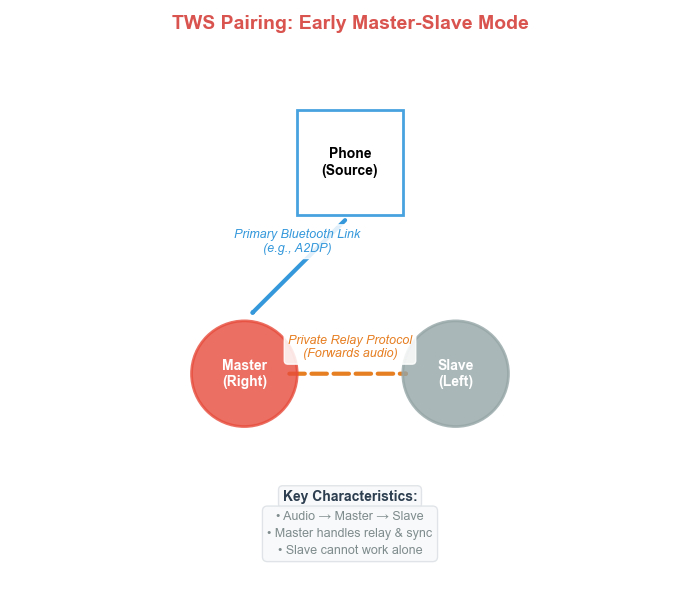
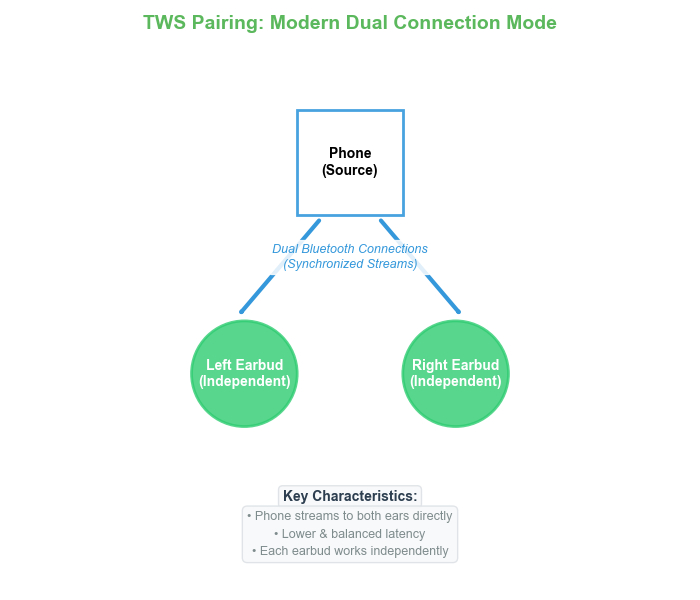
TWS pairing refers to the process of establishing a wireless connection between the left and right earbuds of true wireless stereo headphones and an audio source device (such as a smartphone), achieving synchronized left and right channels. Its core technology has evolved from the early master-slave mode to the current mainstream dual-connection mode.
The Technical Evolution of TWS Pairing
Early master-slave model
The mobile phone establishes a connection via the Bluetooth A2DP protocol only with the primary headset (typically the right earpiece). Audio is first transmitted to the primary headset, which then forwards it to the secondary headset via a proprietary wireless link. This mode exhibits uneven latency and higher power consumption in the primary headset.
Modern Dual-Connection Mode
The phone establishes independent Bluetooth connections with both left and right earbuds simultaneously, delivering audio streams directly and synchronously to both ears. This capability is enabled by Bluetooth 5.0 and later versions, along with manufacturer optimizations.
Advantages of “Dual Connection”: More stable connection, lower and more consistent latency, and support for independent single-ear use in either ear.
Overview of General Usage Steps
Regardless of the mode used, the pairing process on the user end is highly simplified.
First Activation: Open the charging case lid, and the earbuds will automatically power on and enter pairing mode (the indicator light will typically flash).
Mobile Connection: In your phone's Bluetooth settings list, search for and select the headset's name (e.g., “HUAWEI TWS”).
Complete the connection: Tap Connect. Once successful, you can transmit high-quality stereo audio via the Bluetooth A2DP protocol.
Note: During subsequent use, the headphones typically reconnect to your phone automatically when the case lid is opened. To connect to a new device, generally enter pairing mode by long-pressing the touch area on the headphones.
● How to Pair TWS Earbuds Step by Step
Universal Pairing Steps for TWS Earbuds
Step 1: Preparations
Ensure the earbuds and charging case are charged. Remove the earbuds from the charging case; they will turn on automatically (some models require manual activation). This is the foundation for all subsequent operations.
Step 2: Enter pairing mode
Press and hold the touch control area on the earbuds (or the specific button indicated in the manual) until the indicator light begins to flash alternately (usually red and white or blue and white). This indicates the earbuds have entered pairing mode and are broadcasting a signal to be discovered by your device.
Step 3: Connect to the device
Open the Bluetooth settings on your phone or computer, then refresh or scan for nearby devices. In the list of devices that appears, locate and tap the model name of your earbuds (e.g., “HUAWEI TWS”) to connect.
Step 4: Verification and Testing
After a successful connection, you will typically hear a “Connected” prompt. Play a song or make a brief call to verify that both ears are connected properly and that the audio is synchronized.
Additional Operations: Re-pairing and Factory Reset
How do I re-pair?
To connect a new device, simply select the paired headphones' name directly from the device list on the new device. If the connection fails, “Ignore” these headphones on that device, then put the headphones back into pairing mode (repeat step two above) and search for and connect again.
When and how do I restore factory settings?
When encountering unresolvable connection issues, audio desynchronization, or when you wish to clear all pairing records, perform this operation. The standard procedure is: Place the earbuds back into the charging case and press and hold the function button on the charging case for 15-30 seconds until the charging case indicator light displays a specific color sequence of flashes (refer to the specific user manual). This will erase all Bluetooth memory. After restoring factory settings, you will need to pair the earbuds from scratch as if they were brand new.
Key Tips
Indicator Language:
Different brands display varying indicator statuses. In pairing mode, “flashing” is the key signal, while “steady on” or “slow flashing” indicates a successful connection.
Device List Refresh:
If your headphones do not appear in the mobile device list, ensure Bluetooth is enabled and try turning Bluetooth off and on again to refresh the list.
Single-ear mode:
On select models, removing just one earbud after successful pairing allows it to function independently.
How Can I Troubleshoot Common Connectivity Issues with TWS Earbuds?
For common connection issues with TWS earbuds, refer to the troubleshooting guide below. Most problems can be resolved through simple steps.
| Troubleshooting Guide for Common Connection Issues with TWS Earbuds | ||
| Fault Type | Possible causes | Troubleshooting and Operation Recommendations |
| Unable to connect/Pairing failed | 1. The headphones or phone battery is too low 2. Headphones are not in pairing mode 3. Conflicting previous pairing records |
1. Charge the earbuds and your phone. 2. Place the earbuds back into the charging case and remove them again, or press and hold the function button to restart pairing mode. 3. Delete the old pairing record in your phone's Bluetooth settings, then try reconnecting. |
| Sound in one ear only / No sound in one ear | 1. Wireless synchronization between primary and secondary earbuds failed 2. Battery depleted in one earbud 3. Earbuds successfully connected to phone on one side only |
1. Place both earbuds back into the charging case, close the lid for 10 seconds, then remove them to re-establish the connection. 2. Place both earbuds into the charging case simultaneously for 15 minutes of charging. 3. In your phone's Bluetooth list, “Forget” this device, then perform a new pairing. |
| Frequent disconnections/audio dropouts | 1. Bluetooth interference (e.g., Wi-Fi routers, microwave ovens, crowded areas) 2. Headphones are too far from the audio source or obstructed by barriers 3. Bluetooth signal blocked by the body |
1. Stay away from interference sources, or try turning off other Bluetooth/Wi-Fi devices. 2. Ensure usage within 10 meters without thick walls obstructing the signal. 3. Place your phone on the same side as the earbuds, avoiding back pockets. |
| Significant audio-visual lag/game stuttering | 1. Headphones are not in low-latency mode (e.g., gaming mode) 2. Audio codec mismatch or compatibility issues 3. Excessive phone performance or system load |
1. Refer to the manual to enable low-latency mode via the headphone app or touch controls. 2. In your phone's developer options or Bluetooth settings, try switching audio codecs (e.g., SBC, AAC). 3. Close unnecessary background apps and restart your phone. |
| Other General Questions | 1. Software bug or firmware upgrade required 2. Hardware aging or malfunction |
1. Check the official app from your headphone manufacturer and install the latest firmware update for your headphones. 2. Try performing a factory reset (usually achieved by pressing and holding the charging case button). |
When should you consider after-sales service or replacement?
If the issue persists after completing all troubleshooting steps (including factory reset, firmware update, and testing on different devices), it may indicate a hardware failure. Contact customer service especially if any of the following occur:
One earbud consistently produces no sound, and resetting does not resolve the issue.
Persistent connection drops occur even in close proximity environments free from interference.
If your headphone battery life suddenly drops significantly (e.g., from 5 hours to less than 1 hour), this is typically a sign of severe battery degradation.
Key Tip: Systematic troubleshooting should progress from simple to complex steps—first check battery level and distance, then perform a re-pairing, and finally attempt a reset or firmware update. Most Bluetooth interference or temporary disconnection issues can be resolved by moving away from interference sources and restarting devices. Keeping your headphones' firmware updated to the latest version is an effective way to prevent many potential compatibility issues.
What Are the Best Practices for Maintaining and Cleaning TWS Earbuds?
The core of TWS earbud maintenance and cleaning is that prevention is better than repair. By following scientific battery care, understanding the true meaning of the IP rating, and regularly cleaning the charging contacts and earbud tips, you can maximize their performance and longevity. Adhering to proper maintenance and cleaning methods effectively extends the lifespan of TWS earbuds and ensures earbud hygiene. Below is a best practices guide that combines daily care and cleaning steps.
Daily Maintenance Core Principles: Focus on Prevention
Proper usage habits are the primary maintenance, with the core focus on battery care and environmental management.
Proper Battery Maintenance:
Do (Recommendation): During daily use, maintain the battery charge level between 20% and 80%. For long-term storage, keep both the earbuds and charging case at approximately 50% charge.
Don't (Avoid): Avoid letting the battery drain completely or leaving it fully charged for over 24 consecutive hours. Never charge in high-temperature environments (such as inside a car under direct sunlight) or high-humidity conditions.
Note the storage and usage environment:
When storing, use the charging case and keep it in a cool, dry place.
Please note the product's protection rating (e.g., IPX4). It primarily protects against sweat and light rain, but it does not mean it can be washed or submerged. After sweating during exercise, be sure to wipe it dry before placing it in the charging case.
Proper Cleaning Guide: Regular Cleaning
Regular cleaning is essential for maintaining sound quality and earbud hygiene. Please follow these three steps:
Step 1: Clean the earphone body and earbuds
Use a dry microfiber cloth or cotton swab to gently wipe the earphone casing. For ear tips, remove them and wash with mild soapy water. Allow them to air dry completely before reuse. Regularly replacing ear tips effectively prevents earwax buildup.
Step 2: Clean the acoustic grille and microphone openings
Use a dry, soft-bristled brush (such as a clean new makeup brush) or a cotton swab to gently sweep away earwax and dust from the mesh cover. Never use sharp objects to poke or probe, as this may damage the internal dust filter.
Step 3: Clean the charging case and charging contacts
Dip a cotton swab in a small amount of isopropyl alcohol (alcohol content >70%), then gently wipe the metal charging contacts at the end of the earbuds and inside the charging case to remove oxidation and ensure stable charging. Follow up by drying the area with a dry cotton swab. Avoid letting liquid seep into any crevices.
| Quick Reference Guide for Actions: Do & Don't | |
| Do(Recommended Approach) | Don't(Avoid the following practices) |
| Regularly wipe the earbuds and charging case with a cloth to maintain earbud hygiene. | Do not spray or soak the headphones directly with alcohol or cleaning agents. |
| Use a dry, soft-bristled brush to clean the sound holes. | Never use sharp objects such as toothpicks to clean the mesh cover, as this can easily damage it. |
| Clean the metal charging contacts with a cotton swab lightly moistened with rubbing alcohol. | Avoid using in scenarios such as bathing or swimming, even if the device has an IP rating. |
| Follow the medium charge principle for long-term battery maintenance. | Do not use or charge at extreme temperatures (below 0°C or above 45°C). |
| When not in use for extended periods, store the earbuds and charging case with their battery levels maintained at around 50%. | Never charge the earbuds or charging case when they are damp. |
Inside TWS Earbuds: Key Components and Design Considerations
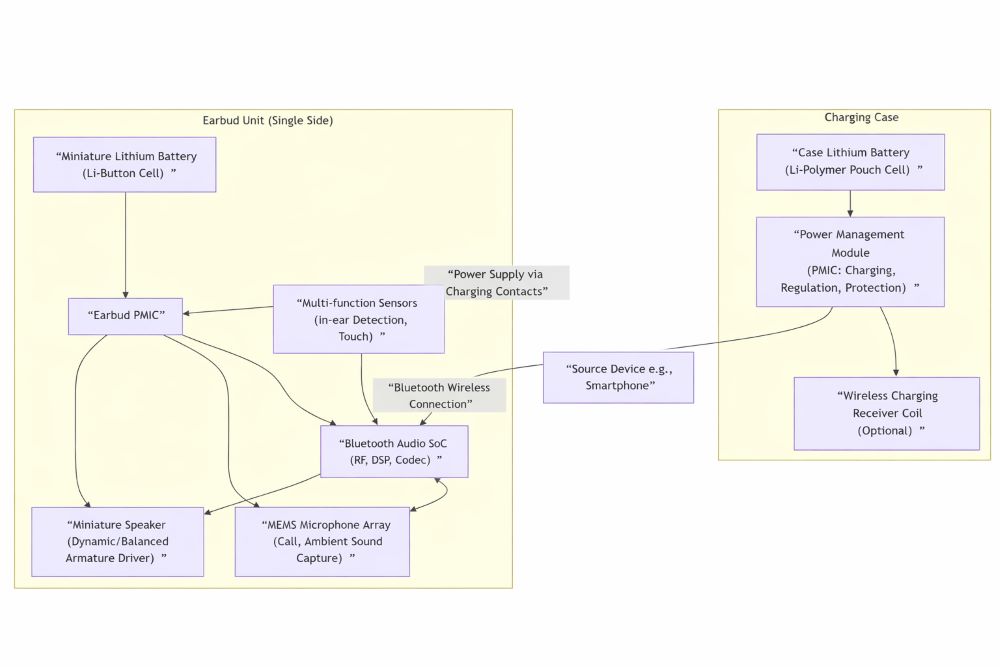
Inside the TWS earbuds lies a highly integrated miniature audio system. At its core is a Bluetooth audio SoC, which integrates RF components, a processor, and codecs to handle wireless connectivity and sound processing. The power management IC efficiently coordinates the charging and discharging of the lithium button battery, serving as the key to battery life. Sound capture and playback are handled by a MEMS microphone array and a miniature speaker unit, respectively.
The design core involves trade-offs at the nanoscale: the Bluetooth version, audio codec support, and algorithm integration within the SoC determine connection quality and functional limits; battery energy density and PMIC conversion efficiency directly impact endurance, while microphone and speaker performance influence sound quality. All components must collaborate within an extremely compact space, ultimately achieving a precise balance between power consumption, audio quality, size, and cost.
To understand the core technology of TWS earbuds, they can be broken down into two primary physical components: the earbud unit (which handles all audio functions) and the charging case (responsible for battery life and storage). The diagram below illustrates their simplified core system architecture:
Detailed Analysis and Selection Criteria for Core Components
Each module in the diagram above involves precise component selection and design trade-offs.
| System Module | Typical Key Components | Core Functions and Selection Criteria |
| Wireless Connectivity and Processing Core | Bluetooth Audio SoC | This is the brain of the headphones, integrating RF, CPU, DSP, and audio codecs. Key considerations during selection include: Bluetooth version (5.3/5.4 preferred, supporting LE Audio & Auracast, affecting connectivity and power consumption), supported audio codecs (e.g., AAC, aptX, LDAC), integration level (whether it includes a built-in ANC algorithm engine), and power consumption levels. |
| Audio Input and Output | MEMS Microphone | Used for call noise reduction and ambient sound capture. High-end models employ multiple MEMS microphone arrays to achieve beamforming and active noise cancellation. Selection criteria include signal-to-noise ratio, sensitivity, size, and power consumption. |
| Driver Unit (Dynamic Driver / Balanced Armature Driver) | Responsible for sound output. Dynamic drivers excel in bass reproduction, while balanced armature drivers offer superior mid-to-high frequency resolution and a more compact form factor. Selection requires balancing sound quality, size, and power consumption. | |
| Power Supply and Energy | Rechargeable Coin Cell / Li-Po Pouch Cell | Powering the headphone drivers. Lithium coin batteries offer high energy density and a compact, uniform shape, making them ideal for miniaturized designs. The primary selection criteria are energy density (battery life) and charge/discharge rate (supporting fast charging), followed by safety and longevity. |
| Power Management IC | The “heart” of the headphones, responsible for battery charging, voltage conversion, power monitoring, and overcharge/overdischarge protection. Component selection must prioritize extremely high conversion efficiency and minimal static power consumption to extend battery life, while also integrating comprehensive protection circuits. | |
| Charging case | Boxed lithium batteries + power management chip | The charging case essentially functions as a compact portable power bank. Its power management chip must support dual-path management: charging the internal battery while simultaneously charging the earbuds via contact points. It also integrates communication capabilities to synchronize battery level information. |
Inside a pair of premium TWS earbuds lies a highly integrated micro-system. The design core revolves around a low-power Bluetooth audio SoC at its center. Within an extremely limited space, it collaborates with MEMS microphones, miniature speakers, and micro lithium batteries through a highly efficient power management chip. The ultimate goal of component selection is to achieve the optimal balance between power consumption, sound quality, battery life, size, and cost.
● Sourcing TWS-Related ICs and Components via Unikeyic
Procuring TWS core components through Unikeyic hinges on precisely matching your design specifications with their extensive in-stock inventory and efficient service. Below are specific procurement strategies and selection recommendations:
Procurement Process and Advantages of Unikeyic
As a leading global distributor, Unikeyic stocks over 200,000 types of electronic components. For TWS projects, its service advantages are significant:
Extensive inventory of genuine products: Our core authorized product lines cover major international manufacturers such as Nordic, Realtek, TI, ST, and ADI. We provide leading Bluetooth SoCs as well as essential peripheral ICs (PMICs, MEMS sensors) from these top-tier brands,providing traceable, authentic components with fast fulfillment for your prototype-to-production needs.
Professional Engineering Support: Equipped with Field Application Engineers (FAEs) and a solution design team, we provide end-to-end engineering technical services.
Efficient Shipping Services: The platform offers streamlined logistics solutions, with same-day shipping being crucial for demo prototyping and trial production, significantly reducing R&D cycles.
Quality Assurance: Equipped with a CNAS-accredited testing center, ensuring all components are 100% quality guaranteed with rigorous testing.
Mapping from System Modules to Unikeyic Product Categories
You can map the core modules in your TWS design to the available product categories on the Unikeyic platform for inquiry and procurement:
| Your System Module (TWS Design) | Examples of corresponding Unikeyic spot product categories and key components | Key Considerations for Model Selection and Query |
| Core: Bluetooth Audio SoC | The main chip typically requires requesting samples from the original manufacturer or top-tier distributors, but peripheral ICs for its complete ecosystem can be procured here. | After determining the primary platform (e.g., Qualcomm, NXP, BES), procure the recommended power management, clock, and interface chips from their reference designs. |
| Power Management Integrated Circuit (PMIC) | Power Management ICs: Battery Charging Management, Low Dropout Regulators (LDOs), DC-DC Converters, Load Switches, etc. | Focus on high efficiency, low quiescent current, and compact packaging. Match according to battery specifications (voltage, capacity) and the voltage/current requirements of each system unit. |
| Battery and Protection | Battery protection IC, MOSFET. The battery cells themselves are typically sourced from specialized cell suppliers. | Protection ICs must be matched to battery chemistry (e.g., lithium-ion) and series-parallel configurations (typically 1 series). Focus on the accuracy of overcharge, over-discharge, and overcurrent protection thresholds. |
| Audio Front End | Audio codecs, headphone amplifiers, MEMS microphones. | Select based on audio quality requirements (signal-to-noise ratio, THD) and microphone quantity (for calls, noise reduction). The audio codec must be compatible with the host SoC's interface (e.g., I2S). |
| RF and Antenna Matching | RF front-end components: RF filters, impedance-matching inductors/capacitors, ESD protection diodes (e.g., TVS) | Ensure the device's operating frequency band covers the 2.4GHz Bluetooth band. TVS is used to protect the antenna port, and attention must be paid to the impact of its junction capacitance on signal integrity. |
| Sensors and Passive Components | Accelerometer, in-ear detection sensor, precision resistors/capacitors, reed switch (for charging case lid detection), etc. | Sensors require attention to power consumption and communication interfaces (such as I2C). Passive components require attention to accuracy, size (0201 or smaller), and temperature stability. |
Systematic Selection Recommendations and BOM Optimization
We recommend selecting and procuring components in the following sequence: Bluetooth SoC → PMIC & Battery Protection → Audio Front End → RF Matching. This sequence ensures stability for power supply and fundamental communication before proceeding with functional expansion.
A typical TWS earbud BOM core IC fragment example is as follows:
| Component Categories | Recommended Models/Brands | Key Parameters and Selection Criteria | Selection Notes |
| Bluetooth Audio Master Controller SoC | Qualcomm QCC307x Series | Bluetooth 5.3 / 5.4, supporting Snapdragon Sound and LE Audio (LC3), with integrated high-performance audio codec and ANC engine. | The core of the solution determines the upper limit of product functionality. Typically, sample chips and development kits must be requested from the original manufacturer or authorized distributors. |
| Power Management IC (PMIC) | TI BQ25120 | Ultra-low quiescent current (~300 nA), integrated linear charger, adjustable LDO, and load switch in a compact WLCSP package. | Responsible for powering Bluetooth chips, sensors, and other components, its efficiency directly impacts headphone battery life. It is a key factor in BOM optimization. |
| Memory (Flash) | GigaDevice GD25LE128E | 128 Mbit SPI NOR Flash, operating at voltages as low as 1.65 V, with extremely low power consumption and a compact package. | Used for storing device firmware, configuration information, and user data. Must ensure compatibility with the host SPI interface. |
| Audio codec (optional) | Cirrus Logic CS42L83 | Signal-to-noise ratio (SNR) up to 114 dB, integrated headphone amplifier and microphone amplifier, supporting both analog and digital microphones. | If the performance of the built-in codec in the main SoC is insufficient, an external high-performance audio codec must be added to enhance audio quality. |
| Battery Protection IC | ABLIC S-82P1A Series | High-precision overcharge/over-discharge/overcurrent protection, ultra-compact SNT package, low-power design. | Essential for safety. Snugly fits the battery to protect the cell from damage caused by abnormal conditions. |
| Sensor (In-Ear Detection + Motion) | Vishay VCNL4040 (Proximity Sensor) + ST LIS2DH12 (Accelerometer) | VCNL4040: Integrated proximity and ambient light sensing; LIS2DH12: Ultra-low power 3-axis accelerometer. | Features include in-ear detection, step counting, and tap control. The primary consideration for selection is ultra-low power consumption. |
| ESD/Interface Protection | ON Semiconductor MMQA27VT1G | Dual-channel TVS array with extremely low clamping voltage for protecting USB data cables and antenna interfaces. | Enhancing the anti-static capability of equipment is particularly crucial for charging contacts and antennas that are frequently plugged and unplugged. |
| Note: This BOM fragment lists only core ICs. A complete TWS earbud BOM should also include: lithium coin cell batteries, MEMS microphones, speaker units, RF inductors and matching capacitors, PCBs, relevant chips within the charging case (e.g., wireless charging receiver ICs, MCUs), and numerous passive components. When selecting components, balance performance, power consumption, cost, package size, and supply chain stability. Utilize Unikeyic distributors' same-day shipping service to quickly obtain samples of these components, accelerating demo validation and BOM optimization processes. | |||
Recommendations for Next Steps
Define Requirements: Establish your TWS product specifications (e.g., whether it supports active noise cancellation or emphasizes low-latency gaming) to identify the appropriate Bluetooth SoC platform.
Obtain Reference Designs: Request official reference design schematics and recommended BOM lists from the SoC manufacturer. These serve as your procurement blueprint.
Platform Search and Replacement: Search using the manufacturer model on the Unikeyic website. If out of stock, contact their customer service or Field Application Engineer (FAE) to find a replacement model with compatible specifications.
Engineering Support: For complex selection or customized solutions, contact Unikeyic directly for professional engineering support.