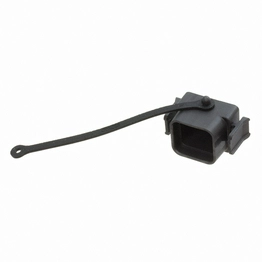
USB, DVI and HDMI accessories protect, seal and complete an existing connector installation. Browse dust caps, protective covers, gaskets and series-specific hardware by starting with the connector manufacturer and part number, then match the interface form, plug or receptacle side, accessory function, material and intended operating environment.
Start with the Existing Connector
1. Part Number Manufacturer and series
›
2. Interface Form USB, HDMI or DVI type
›
3. Function Protect, seal or mount
›
4. Environment Dust, moisture and handling
›
5. Compatibility For-use-with confirmation
Dust Caps
Protect unused USB, HDMI or DVI ports from dust, debris and handling damage. Match the exact interface form, connector side and manufacturer series.
Protective Covers
Cover exposed panel or equipment ports when they are not connected. Check the attachment method, body material and supported connector dimensions.
Gaskets & Seals
Seal the space between a connector and equipment panel. Verify the opening dimensions, flange shape, material and environmental requirements.
Series-Specific Hardware
Complete the mechanical installation of compatible connector families using hardware identified by the manufacturer series and product drawing.
| Compatibility Field |
What to Confirm |
| Interface |
USB, HDMI or DVI |
| Form factor |
Type-A, Type-B, Type-C, Mini, Micro or standard interface size |
| Connector side |
Plug, receptacle, jack or equipment-panel interface |
| Manufacturer series |
Complete manufacturer name, series and connector part number |
| Accessory function |
Dust protection, port cover, panel sealing or mechanical installation |
| Material |
Plastic, elastomer, metal or another specified material |
| Installation |
Push-fit, tethered, panel sealing or series-specific attachment |
Confirm the “For Use With” Specification
Two connectors with the same visible interface may use different shell dimensions, flange designs or accessory attachment methods. Match the accessory to the exact connector series or approved part number instead of selecting by interface appearance alone.
Accessories Complete an Existing Interface
Connector accessories protect, seal or mechanically complete an interface. Products that add a second port, change connector format or convert a signal belong to the adapter selection path.
Choose the matching interface from USB/DVI/HDMI Connectors, browse USB/DVI/HDMI Adapters for connector-format changes, or review Other USB/DVI/HDMI Connectors for specialized products outside the primary groups.